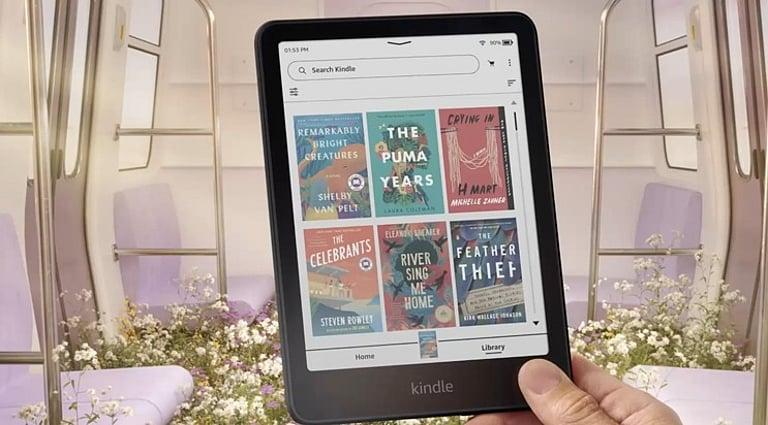
A Fresh Chapter for Digital Reading in Britain
E-readers have transformed the way people read, making it possible to carry hundreds or even thousands of books in a single lightweight device. Across the UK, commuters, students, holidaymakers and passionate book lovers have embraced digital reading as a convenient alternative to traditional paperbacks. Yet, despite years of touchscreen innovation, one question continues to divide readers: has technology made reading easier, or has it taken away some of the simplicity that made books so enjoyable?
The idea of bringing physical page-turn buttons back to the Kindle design speaks directly to this debate. For readers who prefer tactile controls, a dedicated button can offer a more natural way to move through a novel without repeatedly touching the screen. It may sound like a small design change, but it highlights a wider shift in consumer electronics: manufacturers are being challenged to improve everyday experiences rather than simply adding more features.
For British readers who enjoy long novels on the train, squeeze in a few pages before bed or take an e-reader on weekend trips, these seemingly modest improvements could make a meaningful difference.
It is important to distinguish between a design concept, a rumoured product and an officially announced Amazon device. Unless Amazon confirms a specific model and its specifications, the return of physical buttons should be treated as a potential design direction rather than a guaranteed feature of a new Kindle.
Why Physical Buttons Still Matter in a Touchscreen World
Touchscreens have become the standard interface for smartphones, tablets and many e-readers. They are flexible, familiar and allow manufacturers to create clean-looking devices with fewer external controls. However, touchscreen navigation is not always the most comfortable option for every reader.
Imagine reading a gripping crime novel on a crowded train between London and Manchester. One hand is holding a coffee, the other is keeping a bag from slipping, and the train is moving through a tunnel. Reaching across the screen to turn a page may be less convenient than pressing a small button positioned exactly where the thumb naturally rests.
Physical controls can also provide immediate tactile feedback. Readers know that they have pressed a button without needing to look at the screen or judge whether a touch gesture has registered. This can be especially useful when reading in low light, relaxing under a blanket or holding the device at an unusual angle.
For people who read for hours at a time, comfort is often more important than flashy specifications. A well-positioned page-turn button could reduce awkward hand movements and help readers maintain a comfortable grip.
Nevertheless, buttons are not universally better. Some users prefer swiping, while others appreciate the minimalist appearance of touchscreen-only devices. The strongest design would give readers a clear, reliable interface without making the device unnecessarily bulky.
The UK Reading Experience Is Changing
Britain has a strong reading culture, supported by public libraries, independent bookshops, literary festivals and a thriving publishing industry. Digital reading has become another part of this landscape, offering flexibility to people whose routines leave little room for carrying physical books.
For commuters, an e-reader can be particularly attractive. A single device can hold several books, making it easier to switch between a thriller, a biography and a work-related title during the week. Its compact form also helps readers avoid carrying heavier books in a backpack or handbag.
University students have different needs. They may use digital devices to read recommended books, review documents or keep a collection of reference material close at hand. While a Kindle is not a complete replacement for a laptop or a tablet, its reading-focused design can make extended sessions less distracting.
For older readers or people who find touchscreen gestures uncomfortable, physical controls may also improve accessibility. A button with a predictable position can be easier to locate than an on-screen control that changes depending on the interface.
These are practical reasons why a return to physical controls could appeal to a broad audience in Britain. The attraction is not simply nostalgia. It is the possibility of making a familiar activity feel more natural.
Battery Life Remains Central to the Kindle Experience
A comfortable interface matters, but reading convenience also depends on how reliably an e-reader works between charges. Long battery life has traditionally been one of the key advantages of dedicated e-readers compared with general-purpose tablets.
E-ink screens consume relatively little power when displaying a static page. Energy use rises when the display refreshes, the front light is used, wireless connections remain active or additional software processes run in the background. Actual endurance therefore depends on the model, brightness settings, wireless usage and individual reading habits.
For someone who reads for thirty minutes each evening, charging may be an occasional task. A person who spends several hours a day reading, downloads books frequently or travels without easy access to a socket may care much more about remaining charge.
The Kindle e-reader battery is consequently an important consideration when comparing devices, particularly for people who want a dependable companion for commuting and travel. Readers should look beyond headline estimates and consider how a device performs under their own usage patterns.
Physical page-turn buttons could influence energy consumption, but their presence alone would not guarantee longer battery life. The overall result would depend on the hardware, software and display technology Amazon chooses. Efficient components and sensible power management would remain more significant than the interface change by itself.
Could a New Design Make Reading More Accessible?
Accessibility is becoming an increasingly important part of consumer technology design. Products that work well for people with different physical abilities, visual needs and levels of technical confidence can attract a wider audience.
Physical buttons could help readers who have difficulty performing precise gestures on a smooth touchscreen. A dedicated control is generally easy to identify by touch, especially when its shape and position are consistent. It may also help users avoid accidental page turns caused by an unintentional swipe.
However, a thoughtful design should not force everyone to use the same controls. Touch navigation remains useful for selecting text, opening menus, searching a book and adjusting settings. A combination of buttons and touchscreen functionality could therefore offer more flexibility than either approach alone.
Other accessibility features also matter. Adjustable font sizes, different typefaces, line spacing, screen illumination and text-to-speech support where available can make digital reading more comfortable. Clear menus and reliable navigation can be just as important as the physical design.
For British consumers choosing an e-reader as a gift, these details deserve attention. A device that suits the recipient’s reading habits and physical needs is likely to offer more lasting value than one selected solely because it has the newest specifications.
Kindle Versus Tablets: Different Devices for Different Readers
The competition between e-readers and tablets is not simply a contest over screen size or processing speed. These devices are designed around different priorities.
A tablet offers colour displays, video streaming, web browsing, games, productivity applications and access to a wide range of digital services. It is an excellent option for users who want one device to handle multiple tasks.
A Kindle, by contrast, is designed primarily for reading. Its e-ink display resembles printed paper more closely than the bright, constantly illuminated screen of a conventional tablet. Many readers value this visual experience, particularly during long reading sessions.
Dedicated e-readers can also encourage a more focused routine. Without the same variety of notifications and entertainment applications found on a tablet, readers may find it easier to stay immersed in a book.
The return of physical buttons, if introduced in a future model, would reinforce this reading-first philosophy. It would signal that the product is not trying to become another general-purpose touchscreen device. Instead, it would focus on making the central task—turning pages and enjoying books—as comfortable as possible.
For UK shoppers, the right choice depends on whether reading is the main purpose of the device or just one activity among many.
What Frequent Readers Should Look for Before Buying
A new design can attract attention, but buyers should assess the complete reading experience before spending money. Screen quality, weight, storage, lighting, waterproofing on applicable models and software support can all affect long-term satisfaction.
Screen size is particularly important for people who read different types of content. A compact model may be easier to carry on public transport, while a larger display can make text feel more spacious. Adjustable lighting is useful for moving between bright outdoor environments and dim bedrooms.
Storage needs also vary. Readers who mainly download ordinary novels may require less space than people who keep extensive libraries, illustrated books or large documents on their devices.
Battery performance should be considered alongside these factors. The Kindle e-reader battery is not judged solely by how long a manufacturer says a charge will last. Charging frequency, wireless connectivity, screen illumination and the age of the device all influence the experience. Reading independent reviews that describe real-world usage can help buyers establish whether a particular model meets their needs.
It is also sensible to check which features are actually included. A rumoured button layout or an unconfirmed hardware improvement should not determine a purchase until reliable specifications are available.
Sustainability and the Value of Keeping Devices Longer
As consumers become more conscious of electronic waste, product longevity is gaining importance. An e-reader may have a relatively simple purpose, but replacing it unnecessarily still contributes to the wider environmental footprint of consumer electronics.
A durable casing, reliable buttons, dependable charging connections and continued software support can help a device remain useful for longer. Physical buttons also need to be engineered carefully: frequently used controls must withstand repeated presses without becoming loose or unreliable.
Battery ageing is another consideration. Rechargeable batteries gradually lose capacity through normal use and repeated charging cycles. Over time, a device that once lasted weeks may need to be charged more frequently. This does not necessarily mean that the entire e-reader has reached the end of its useful life.
Owners experiencing declining endurance should first review settings, wireless activity and charging behaviour. If the problem persists, they can check Amazon’s support information or consult a qualified repair provider about available options. Repairability varies by model, so replacement should never be assumed to be simple or economical.
The Kindle e-reader battery is therefore part of a broader ownership question: how can consumers keep a useful reading device working for as long as possible? A product that balances durable construction, efficient power use and practical repair options can offer better long-term value than one designed around frequent upgrades.
Will Readers Welcome a Return to Simpler Controls?
The appeal of physical page-turn buttons reflects a wider trend across technology. Consumers increasingly value devices that solve everyday problems without demanding constant attention. Mechanical controls, dedicated switches and straightforward interfaces can feel refreshing in a market often dominated by touchscreens and software-driven features.
That does not mean every product needs to return to an older design. Modern touchscreens remain highly effective, and removing them would sacrifice important functionality. The opportunity lies in combining modern technology with the physical controls that genuinely improve usability.
For Amazon, the challenge would be to deliver a button-equipped Kindle without compromising portability, display quality, water resistance where offered or battery efficiency. The placement of the buttons would need careful testing, and the device should remain comfortable for both left-handed and right-handed readers.
British customers would also expect a competitive price and a clear reason to upgrade from an existing Kindle. A small design improvement may be appealing to frequent readers, but occasional readers could reasonably prefer a more affordable model with familiar touchscreen controls.
Ultimately, the success of such a design would depend on execution rather than nostalgia alone.
The Future of Digital Reading Is About Comfort
The Kindle’s greatest strength has always been its ability to make reading convenient. A large library can travel in a coat pocket or handbag, fonts can be adjusted to suit individual preferences, and books can be downloaded without visiting a shop.
Physical page-turn buttons could strengthen that experience by making navigation feel more deliberate and tactile. For some readers, the improvement would be minor. For others, particularly those who read for hours or prefer simple physical controls, it could make a meaningful difference.
The wider lesson for consumer electronics manufacturers is clear: innovation does not always require adding more features. Sometimes, it means reconsidering familiar details and understanding how people actually use their devices every day.
Until Amazon confirms a specific new Kindle design, British shoppers should treat reports of returning page-turn buttons as a possibility rather than an established product announcement. In the meantime, comparing display comfort, battery endurance, accessibility and long-term usability remains the best way to choose an e-reader.
Whether the next generation of digital reading relies on touchscreens alone or brings physical buttons back into the spotlight, the goal remains the same: helping people spend less time managing technology and more time enjoying a good book.